Case study
How Lotum builds the UI of 4 Pics 1 Word in Widgetbook

123 components, 202 use cases, and a review flow where designers and developers look at the same widget in every state.
Summary
Company: Lotum, German game studio behind 4 Pics 1 Word (250M+ players)
Challenge: building and checking game UI meant navigating the real app, extra simulators for tablets, and long manual reviews
Solution: every widget is built in Widgetbook first; Widgetbook Cloud attaches the affected use cases to every pull request
Result: layout, animation and design reviews happen on the widget itself, before anything is merged
Stack: Flutter, Widgetbook, Widgetbook Cloud, GitHub
Lotum is a game studio in Bad Nauheim, Germany. Its flagship game, 4 Pics 1 Word, has more than 250 million players in 9 languages, and Lotum rewrote it in Flutter for every platform.
A word game lives on its UI: puzzle screens, success layers, badges, trophies and dozens of micro animations, all of which must look right on every phone and tablet. At Fluttercon 2024 in Berlin, Joachim Böhmer, lead developer of the 4 Pics 1 Word team and host of the programmier.bar podcast, showed how Lotum maximized its developer experience with Widgetbook and Widgetbook Cloud.
Building widgets inside the game
Before Flutter, Lotum built its UI in Swift and Kotlin, and every change took a long time. Flutter’s hot reload improved that drastically.
But the widgets were still built inside the running game. Developers placed a new widget on the start screen, so a hot restart brought them straight back to it. To reach other states, the team built a debug menu that could set any app state, for example jumping to a level and entering the solution to see the success layer for that puzzle.
It worked, but every widget was still tied to the app around it.

Every widget starts as a use case
With Widgetbook, Lotum develops widgets in isolation. When the team implements a new widget, the first step is setting up its use case. Functionality and UI are then built inside Widgetbook, not inside the game.
Widgetbook shows every state a widget can enter, including edge cases that would be very hard to set up in the real app.
Building this way also changed how the team designs its widgets. To cover every state with Widgetbook’s knobs, developers think early about what the widget really needs as input:
“Development of widgets in isolation helps us to identify the minimal API that the widget needs to provide.”
One example from the talk: the LeaderboardTrophy widget, which only needs the achieved position and a size to render its state. For larger widgets like whole pages, Lotum separates the view from the logic with reactive view models, so pages can live in Widgetbook too.

Phones and tablets without a second simulator
Lotum’s layouts scale automatically, but a different screen ratio, such as a tablet, still needs its own check. In practice that check was often forgotten during development.
Developers worked around it by running a second simulator for a tablet next to the phone simulator. It happened so often that tablet validation became a fixed step in every test round and in QA.
Now the check happens in the use case. Widgetbook’s device frame addon switches instantly between devices and screen sizes. Lotum configures it with common devices and with custom definitions for the screen sizes its players use most.
“With this add-on it is much simpler to validate your layout during development, and also for the designer in the review process.”
Slowing down animations to get them right
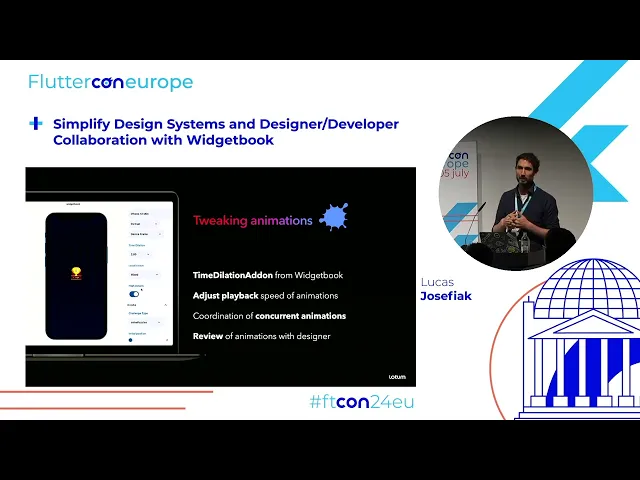
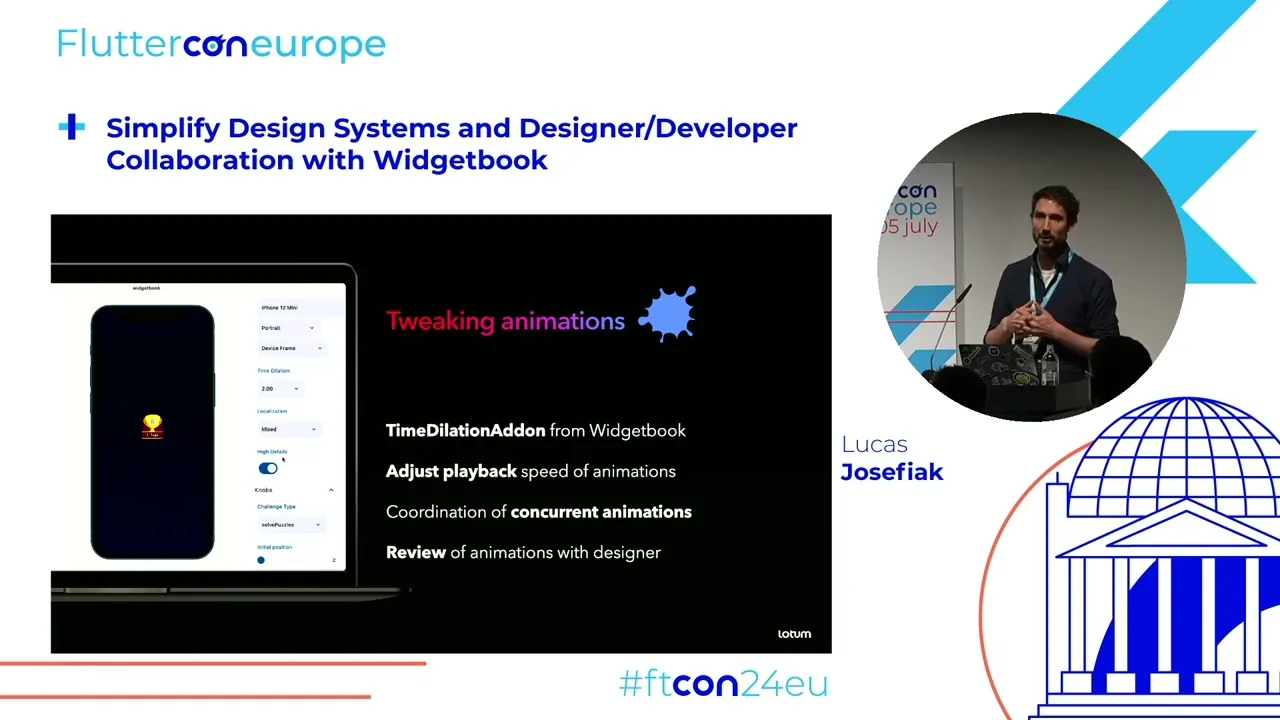
A game is full of micro animations, and 4 Pics 1 Word is no exception. Widgetbook’s time dilation addon changes the playback speed of any animation.
In his demo, Joachim first ran a reward animation at normal speed, then slowed it down to see exactly how the badge slide and the trophy pop overlap.
Coordinating many animations that run at the same time is where this pays off most. Developers tune the timing, then review and adjust it together with a designer, on the widget itself.
Reviews that start from the use case
Reviewing a feature used to be slow. The reviewer first had to find every widget the feature touched. Then they had to prepare the exact screen state in the app to check the design and how the widget sat on the screen.
Testing every UI state was cumbersome, because the reviewer had to read the embedding code to work out how to put the app into each state. And when a designer found a glitch, they had to explain in detail how the developer could reproduce it.
With Widgetbook, this changed drastically. Reviewers now look at the use cases a feature introduced and can check every UI state directly.
Widgetbook Cloud and its GitHub app take this into the pull request. Every PR gets a list of the use cases of all affected widgets. Reviewers open them in Widgetbook Cloud and compare the new version of a widget with the version on the base branch.
“This has simplified the review of the UI parts of a feature very much.”
Widgetbook Cloud now tests Lotum’s use cases on an iPad Pro and an iPhone SE viewport, so the tablet check that used to be forgotten runs on every build.

Results: all visual development in one place
For the 4 Pics 1 Word team, Widgetbook is where UI gets built, checked and discussed:
“All of our visual development happens in Widgetbook.”
The impact falls into four areas:
Faster time to market: widgets are built and tested in all states and configurations without touching the game.
Quality assurance: every UI change is detected automatically in the pull request and reviewed systematically.
Less friction between developers and designers: Widgetbook is the shared basis for design reviews.
Better developer experience: no more start screen hacks, debug menus or second simulators to see a widget.
Watch the entire talk
See Joachim’s full session from Fluttercon 2024: Widgetbook at Lotum, Fluttercon 2024.
Want the same workflow for your Flutter app? Get started for free with Widgetbook Cloud or use our open-source package.