Case study
How LeanCode ships a custom design system for every client with Widgetbook

One template, forked for every project, with a living component catalog each client keeps after handover.
Summary
Company: LeanCode, Flutter agency in Warsaw, startups to enterprises and banks
Challenge: give every client a custom design system without rebuilding one per project
Solution: a template design system in Figma and Flutter, cataloged in Widgetbook and reviewed in Widgetbook Cloud, forked for each client
Result: each client gets its own design system and Widgetbook from day one, used for development, reviews, onboarding and handover
Stack: Flutter, Figma, Widgetbook, Widgetbook Cloud, VS Code
LeanCode is a Flutter agency based in Warsaw, Poland, and an official Google Flutter consultant. Its teams build apps for clients of every size, from early startups to banks and large corporations.
Every one of those clients wants an app that looks like its own brand. Building a design system from scratch for each project would be slow and expensive. So LeanCode built one design system to start from, and made Widgetbook part of it.
In a customer session at Widgetbook’s “Simplify Design Systems and Reviews” talk at Fluttercon Europe 2024, Flutter developer Albert Wolszon showed how LeanCode uses Widgetbook as a software agency.
One design system, many clients
LeanCode’s design team maintains its own design system in Figma. It is built to be highly customizable, so it can absorb whatever a client asks for.
The key decision is that no client uses the template directly. When a new project starts, the team copies the Figma file, and that copy becomes the client’s design system. Each project can change it freely, and the template stays clean:
“They can make whatever adjustments or horrendous decisions they want, without our design system team even having second thoughts about it.”
The template, in Flutter and in Widgetbook
The Flutter implementation of the design system lives in LeanCode’s monorepo, inside the project template used to set up every new client app. Next to it sits its Widgetbook.

That Widgetbook works as documentation for everything in the design system. Tokens like colors are shown in tables. Components, from small atoms to complex widgets, can be previewed in every variant using addons and knobs.

Building components in isolation
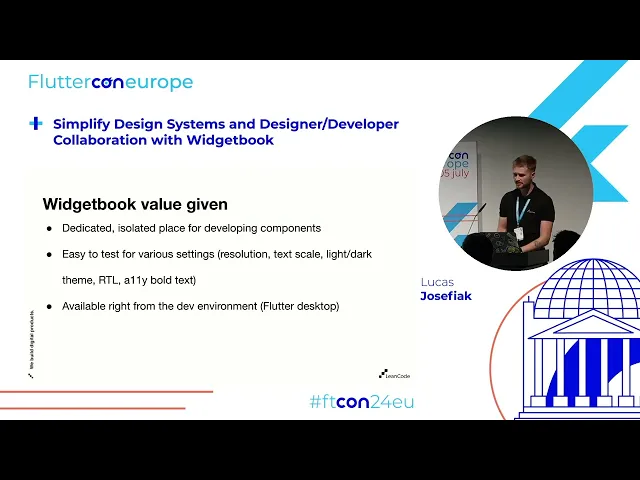
For the developers building the design system, Widgetbook is a dedicated, isolated workspace:
“Developers have a dedicated and isolated place where they can develop these components. They don’t need to know how the template looks or have everything set up to run the whole application.”
They run Widgetbook as a Flutter desktop app with the tools they already have. From there, they can check the cases a design system has to get right: the smallest and largest text scales, every theme, right-to-left text, and accessibility settings like bold text.

Reviewing with designers in Widgetbook Cloud
LeanCode connected the template to Widgetbook Cloud. Every pull request now gets a hosted preview, so people without the repository on their machine can see the change:
“Widgetbook Cloud gives us a nice way of previewing pull requests for people that don’t have the repository cloned.”
The design system’s designers use these previews to confirm that each component looks as it should before it is merged. Visual diffs, like golden tests, show exactly what changed.

After the fork: a design system and a Widgetbook for every client
When a client project forks the template, it inherits the Flutter design system and its Widgetbook along with the Figma file. Albert summed up what that means for clients:
“After we fork it, the client has their own design system basically for free. And what’s even better, they have Widgetbook.”
In client projects, Widgetbook does three jobs:
Documentation: a record of every UI piece already built, which the client can keep after handover or keep building on.
Onboarding: new LeanCode developers on the project, and the client’s own developers, see what is available to build the next screens with.
Stakeholder reviews: when a client wants to be more involved, LeanCode deploys the project’s Widgetbook to Widgetbook Cloud, so stakeholders review UI with the same flow the template uses.
“If the client wants to be more involved together with their stakeholders, we can just deploy the Widgetbook to Widgetbook Cloud. It's very easy to do so.”
Developers like it too
LeanCode’s developers enjoy working in Widgetbook enough to improve it themselves. Before the Widgetbook annotation package existed, one of them built a VS Code extension that generates Widgetbook use cases from a widget with a quick action. It maps each constructor to a use case and each property to a knob, and it is available on the VS Code Marketplace.

Watch the talk
See Albert’s full session: LeanCode’s Case: How to use Widgetbook as a software agency.
Building Flutter apps for several clients and want to have a similar workflow? Get started for free.
Looking for a Flutter partner? LeanCode builds Flutter apps for startups and enterprises.